In 2022 many Ukrainian government agencies, state enterprises and regulated companies moved their information systems to Microsoft Azure, AWS and other public clouds abroad to keep them running under martial law. It worked — but most of those systems are still backed up inside the same cloud, with the same provider and often in the same region. If the account is blocked, the region fails or an attacker obtains administrator rights, production and every recovery point disappear together.
An independent recovery reserve closes that gap: an immutable, encrypted copy of every critical system, kept in a certified data center in Ukraine, refreshed every day and tested on a schedule. This article walks through the reference architecture we deploy, how to size it, what it costs and how to roll it out in about 40 days.
Why native cloud backup is not an independent reserve
Native backup services are excellent for everyday restores, but they share the fate of the platform they protect. Azure Backup keeps recovery points in a Recovery Services vault that belongs to the same subscription and tenant; with locally redundant storage (LRS) every copy lives in a single region. AWS Backup vaults follow the same pattern.
- Same provider, same failure domain. An account suspension, a billing dispute, a sanctions decision or a regional outage takes production and backups offline at the same moment.
- Same identities. A compromised global administrator can change backup policies, shorten retention or purge soft-deleted items unless every safeguard is configured perfectly.
- No export path. Azure Backup recovery points cannot be exported as files. The only way to get data out is to restore the disks of one recovery point and download them in full — every time.
The last point shapes the whole project: you cannot simply “transfer the existing backups” to another data center. An independent reserve needs its own backup chain — one full copy, then daily incrementals — written to storage that the cloud provider does not control.
What Ukrainian regulation expects from high-impact systems
Ukrainian rules point the same way. The mandatory requirements for information systems approved by Cabinet of Ministers Resolution No. 205 of 21 February 2025 expect owners of category I and II systems to keep a recovery reserve that is independent of the primary operating environment.
Cabinet Resolution No. 263 of 12 March 2022 allows state information resources to be hosted in clouds abroad during martial law and obliges public bodies to stop doing so within six months after it ends. A current copy in Ukraine is the practical precondition for that move back.
Where the reserve may live is regulated too. Under the Law of Ukraine “On Cloud Services” and Cabinet Resolution No. 154 of 11 February 2025, public bodies use cloud and data-center services from providers on the official list kept by the State Service of Special Communications and Information Protection (SSSCIP). In mid-2026 the list included De Novo, GigaCloud, DataPark and UCloud — all of them operate cloud infrastructure with a KSZI (comprehensive information protection system) attestation.
Bottom line: an independent copy in a KSZI-certified cloud in Ukraine closes the resilience gap, meets the reserve requirement for category I–II systems and prepares the return path from foreign clouds.
Reference architecture: two immutable copies in Ukraine
The design keeps the native cloud backup untouched and adds a separate, independent chain that ends in Ukraine.
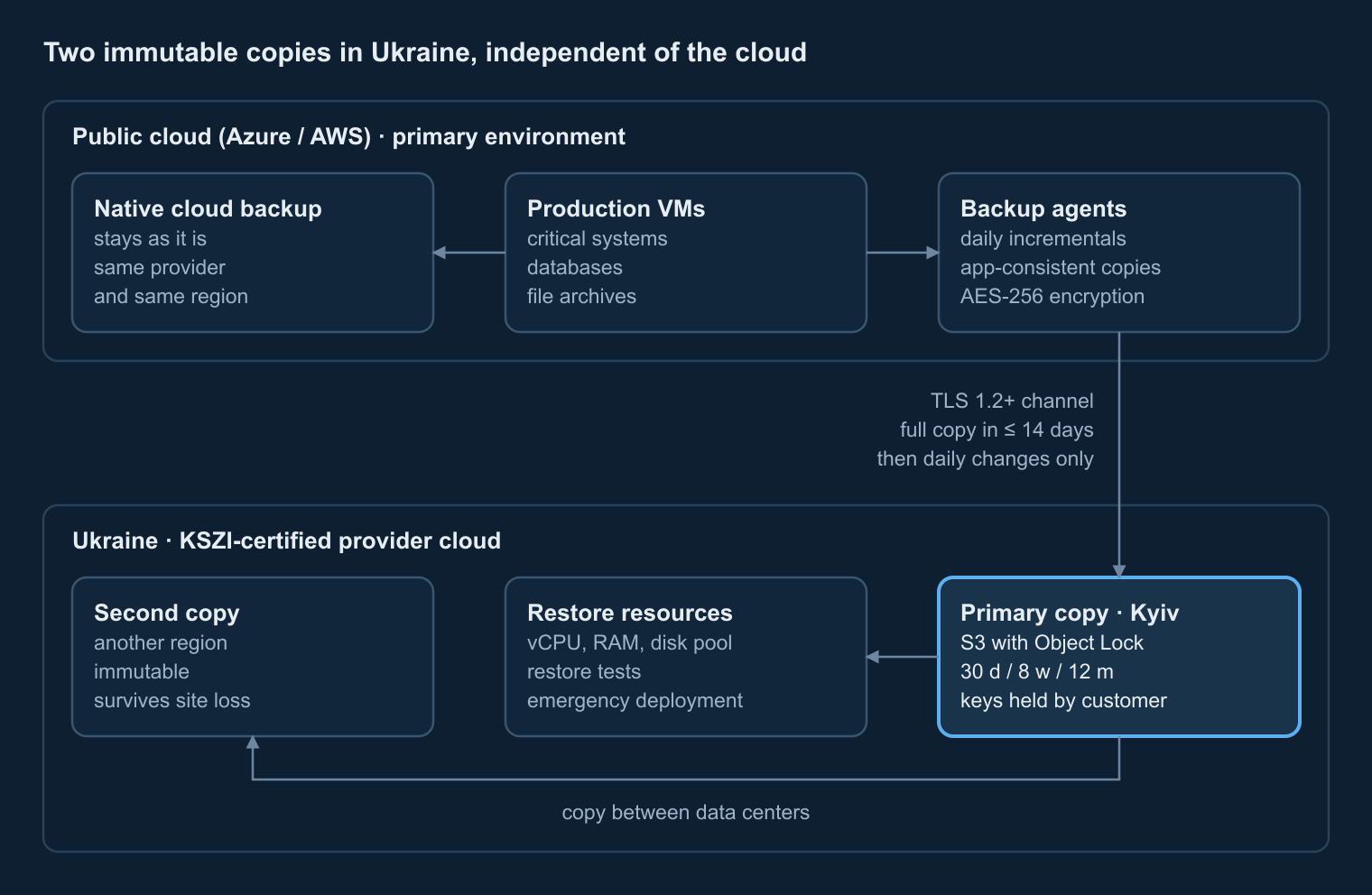
- Backup agents in the cloud. Veeam agents (or Veeam Backup for Microsoft Azure) run next to each protected VM and create application-consistent copies of Oracle, Microsoft SQL Server and PostgreSQL databases. Data is compressed and encrypted with AES-256 before it leaves the VM.
- Encrypted transport. Copies travel over TLS 1.2+ to an S3-compatible endpoint in Ukraine. The first full copy is seeded within two weeks; after that only daily changes are sent.
- Primary immutable copy. An S3 bucket with Object Lock in compliance mode (WORM) keeps every restore point unchangeable for the whole retention period — even administrators cannot delete it.
- Second copy in another region. Restore points are replicated to a data center in a different Ukrainian region, so losing one site does not mean losing the reserve.
- Restore resources. A pool of vCPU, RAM and disk next to the storage is used for scheduled restore tests and, when needed, to bring systems up in Ukraine without the cloud.
Identity is separated on purpose: backup accounts use their own multi-factor authentication and are not federated with the customer’s Microsoft Entra ID, so a compromised cloud tenant gives no path to the copies. Encryption keys stay with the customer.
Retention policy and storage sizing
Capacity is driven by the size of one full copy, the daily change rate and the retention policy. A grandfather-father-son (GFS) scheme of 30 daily, 8 weekly and 12 monthly restore points is a common target for category I systems; a lighter 14-day / 4-week policy fits less critical workloads.
| Input | Example value | Why it matters |
|---|---|---|
| Used data (not provisioned disks) | 20 TB | Sets the size of the full copy |
| Data reduction | 1.5× | Full copy ≈ 13.3 TB on storage |
| Daily change after reduction | 200 GB | Size of each daily restore point |
| Retention | 30 d / 8 w / 12 m | Number of restore points kept |
| Result incl. overhead and 15% growth | ≈ 42 TB | vs ≈ 22 TB for 14 d / 4 w |
The most common mistake is to size the reserve as “one copy of the disks”. With a 12-month policy the history can be as large as the full copy itself. Our step-by-step sizing guide shows the formulas and a worked example.
What drives the cost
A reserve in Ukraine has four cost lines. Knowing them up front keeps the budget request honest.
- Storage per TB per month in the provider’s KSZI-certified cloud, for the primary and the second copy. Billing usually follows the actual average monthly volume.
- One-time services: design and setup of the backup chain, seeding of the full copy and the first round of restore tests.
- Restore resources per month of use — for tests and for emergency recovery.
- Cloud egress, billed by the cloud provider. At Azure list prices for Europe, the first 10 TB per month cost $0.087 per GB and the next 40 TB $0.083 per GB, so seeding 25 TB costs roughly $2,100 and 6–15 TB of monthly changes $500–1,300.
Compression, deduplication and routing-preference pricing can cut the egress line by a third or more. If the cloud subscription is covered by a sponsorship programme, egress may already be paid for.
Restore testing and recovery resources
A copy that has never been restored is a hope, not a reserve. We restore every protected system after the initial seeding and repeat full tests at least once a year, documenting the measured recovery time (RTO) and recovery point (RPO).
For the largest systems — typically a two-server document management system or an ERP database — the restore pool needs enough disk for the full dataset and two VMs running at the same time. A pool of 32 vCPU, 128 GB RAM and 20 TB of disk covers most mid-size organizations and doubles as an emergency landing zone if the cloud becomes unavailable.
40-day rollout plan
- Days 0–5. Access, storage buckets with Object Lock, backup server, encryption, MFA and audit logging.
- Days 5–19. Initial full copy of every protected VM; daily incrementals start as soon as each VM’s first copy completes.
- Days 19–26. Replication to the second region and verification of the copy chain.
- Days 26–40. Restore tests of every system, test protocols, backup policy and disaster-recovery plan.
- Every month after. Monitoring, integrity checks and a report on job success, volumes and incidents.
What you get with Corvus Intelligence
- A documented architecture and backup policy aligned with the reserve requirement for category I–II systems.
- Immutable primary and secondary copies in KSZI-certified clouds of providers on the SSSCIP list.
- Restore tests with protocols and a disaster-recovery plan your team can execute.
- 24/7 monitoring of backup jobs and an SLA with a one-hour response to critical incidents.
- Transparent unit pricing — per TB, per month of restore resources and per one-time service — ready for a budget request.
The reserve pairs naturally with continuous security monitoring: our managed SOC on Security Onion watches backup events alongside the rest of the infrastructure and alerts on any attempt to tamper with them.
Get a sizing and cost estimate for your reserve
Send us the list of systems and data volumes — we will return an architecture, a storage and egress estimate and a rollout plan.
This guide was prepared by Corvus Intelligence engineers who design backup, disaster recovery and security monitoring for government and critical-infrastructure organizations. About Corvus Intelligence →