
Budget requests for an off-site backup usually go wrong in one of two ways: storage is sized as “one copy of the disks”, or the cloud egress bill is forgotten. Both mistakes surface months later — when retention fills the bucket or the first invoice arrives.
This guide gives the formulas we use to size an immutable off-site copy — storage, transfer time, egress and restore capacity — with a worked example you can adapt to your own numbers.
The five inputs you need
- Used data (D) — the data actually stored on the protected disks, not their provisioned size. A 4 TB disk that is 40% full contributes 1.6 TB.
- Data reduction ratio (r) — compression and deduplication achieved by the backup software; 1.3–2× is typical for mixed servers.
- Daily change (Δ) — new and changed blocks per day after reduction. Measure it from the incremental sizes of your current backups.
- Retention policy — how many daily, weekly and monthly restore points you keep.
- Growth — expected data growth over the contract period, usually 10–20% a year.
Storage formula for GFS retention
With incremental-forever backups on object storage, each restore point stores only the blocks that changed and are not shared with newer points. That gives a simple estimate:
Storage ≈ F + Nd × Δ + Nw × Δw + Nm × Δm + overhead

F   = D / r        full copy
Nd  = daily points                  Δ  = daily change
Nw  = weekly points beyond dailies  Δw ≈ 2.5 × Δ
Nm  = monthly points beyond weeks   Δm ≈ 6 × Δ
overhead ≈ 10% for Object Lock and metadata
The weekly and monthly multipliers reflect that many daily changes overwrite the same blocks; replace them with measured values once you have a month of history. Worked example: 20 TB of used data, 1.5× reduction and 200 GB of daily change.
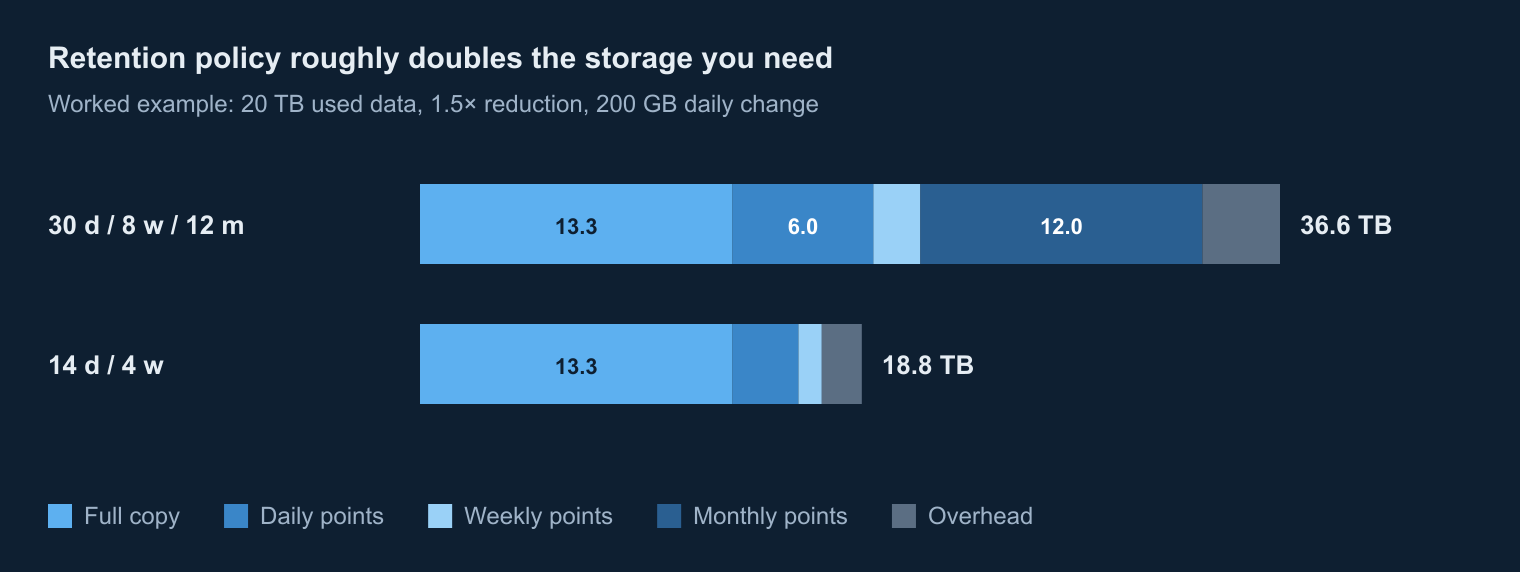
| Component | 30 d / 8 w / 12 m | 14 d / 4 w |
|---|---|---|
| Full copy (20 TB ÷ 1.5) | 13.3 TB | 13.3 TB |
| Daily restore points | 30 × 0.2 = 6.0 TB | 14 × 0.2 = 2.8 TB |
| Extra weekly points | 4 × 0.5 = 2.0 TB | 2 × 0.5 = 1.0 TB |
| Extra monthly points | 10 × 1.2 = 12.0 TB | — |
| Immutability overhead (10%) | 3.3 TB | 1.7 TB |
| Total | ≈ 36.6 TB | ≈ 18.8 TB |
| With a 15% growth buffer | ≈ 42 TB | ≈ 22 TB |
The retention policy roughly doubles the capacity. Agree it per system: category I systems often need 12 monthly points, while test and auxiliary systems are fine with 14 days.
Object Lock and immutability overhead
Object Lock in compliance mode keeps every object until its retention date, even after the backup software no longer needs it. Backup tools therefore extend lock periods in blocks of days (Veeam, for example, typically adds up to ten days), and expired points are removed only after the lock ends. Budget 10–15% on top of the retention math, and never plan immutable storage for 100% utilisation: a full bucket cannot be cleaned up early.
Initial seeding: bandwidth and duration
The first full copy is the largest transfer. Plan the channel so seeding finishes within two weeks, remembering that only about 80% of nominal bandwidth is usable over long periods:
Days = Data (TB) × 8 000 000 / (Bandwidth (Mbit/s) × 0.8 × 86 400)| Data to seed | 100 Mbit/s | 300 Mbit/s | 1 Gbit/s |
|---|---|---|---|
| 10 TB | 11.6 days | 3.9 days | 1.2 days |
| 25 TB | 28.9 days | 9.6 days | 2.9 days |
| 50 TB | 57.9 days | 19.3 days | 5.8 days |
Daily incrementals are much smaller: 500 GB in an eight-hour window needs about 140 Mbit/s, or under 50 Mbit/s when spread over 24 hours.
Cloud egress costs
Data leaving a public cloud is billed per gigabyte by the cloud provider, not by the backup provider, so it belongs in the budget request as a separate line. Azure list prices for internet egress from Europe (routed through the Microsoft network):
| Monthly volume | Price per GB |
|---|---|
| First 100 GB | free |
| Next 10 TB | $0.087 |
| Next 40 TB | $0.083 |
| Next 100 TB | $0.07 |
In the worked example, seeding the 13.3 TB full copy costs about $1,137, and 6 TB of monthly changes about $513 a month, or $6,160 a year. Three levers reduce the bill: compression and deduplication before transfer, the cheaper “routing preference: internet” option ($0.08 and $0.065 per GB in the first two tiers), and sponsorship or credit programmes that may already cover the subscription.
Sizing restore capacity
Restore tests need compute and disk next to the backup storage. Size the pool for the largest system you must restore at once, not for the average one:
- Disk: the used data of the largest system plus 20% working space.
- Compute: enough vCPU and RAM to run its servers together — for example two VMs with 8 vCPU and 32 GB each.
- Time: testing every system usually takes two to four weeks of pool time per year.
Sizing checklist
- Measure used data per server and database size, not provisioned disks.
- Pull 30 days of incremental sizes from current backups to get the real daily change.
- Agree retention per system category before you ask for prices.
- Add 10–15% for immutability and 10–20% for growth.
- Size the seeding channel for 14 days or less, and the daily window for the peak change rate.
- Put cloud egress into the budget request as a separate line.
Prefer not to do the math yourself? Send us the inputs: we size the sovereign off-site backup reserve and return a costed architecture.
Send us your numbers — we will size it
Share used data, daily change and retention for your systems, and we will return storage, bandwidth, egress and restore-capacity estimates with a costed architecture.
This guide was prepared by Corvus Intelligence engineers who design backup, disaster recovery and security monitoring for government and critical-infrastructure organizations. About Corvus Intelligence →