A WinTAK plugin is a .NET Framework class library, written in C# with WPF, that WinTAK discovers through the Managed Extensibility Framework (MEF) and loads into its own process. It can add ribbon buttons, dockable panes, map tools, Cursor on Target (CoT) handlers and background services. You build it in Visual Studio against the WinTAK SDK matching your users' exact WinTAK release and ship it as a .wpk package.
This guide is for .NET teams starting WinTAK plugin development and for program staff sourcing WinTAK plugins. It complements our ATAK and WinTAK plugin engineering overview and WinTAK in the command post. Class and interface names come from the published WinTAK SDK API reference and its "Extending WinTAK" guide; the API evolves between releases, so check each name against the SDK version you build with.
What is WinTAK?
WinTAK is the Windows member of the Team Awareness Kit (TAK) family: a government-off-the-shelf (GOTS) application and mapping framework that its user manual describes as running "both in a tactical environment and in a Command and Control environment". It shares the CoT event model of ATAK and iTAK (see TAK protocol: CoT XML vs protobuf), connects to TAK Server and handles overlays, data packages, video and chat. Signed WinTAK installers name PAR Government as the verified publisher, and recent 5.x releases target .NET Framework 4.8.1 on 64-bit Windows.
The tak.gov product pages list two WinTAK product lines. WinTAK-CIV, "Windows OS Team Awareness Kit for Civilians", is the edition you get by registering on tak.gov; TAK-CIV binaries are public after approval, excluding embargoed countries and parties on the Denied Persons List. WinTAK-MIL (the Windows Tactical Assault Kit) is restricted to US military use, and foreign governments get TAK-MIL only through Foreign Military Sales. tak.gov classifies ATAK-CIV as EAR99 but says other TAK-CIV product lines are still being evaluated, so do not assume WinTAK-CIV has the same classification. Use beyond test and evaluation needs an authority to operate (ATO) from your organization.
WinTAK version numbers track ATAK's. The public tak.gov release schedule lists WinTAK 5.8 for August 2026 and 5.9 for December 2026, each with a feature freeze a month earlier. tak.gov also lists TAKX, "the culmination of two prominent Windows-based Command and Control platforms: WinTAK and RaptorX", with its own variants and plugin listing. If you are choosing a desktop client for the next few years, ask which one your users will field before fixing a plugin target.
Where to get WinTAK plugins
If you need existing WinTAK plugins rather than a new one, look in four places:
- The WinTAK installer. Optional plugins that match the build are bundled and ticked on a checklist during setup; re-run the installer and choose Modify to add more. The quick start guide uses Data Sync and ExCheck as examples.
- tak.gov plugin listings. tak.gov keeps a WinTAK plugins page, and some plugins ship as separate .wpk files. You need an account, and what you can download depends on your role.
- Hardware and software vendors. Many plugins exist because a company wants its sensor, radio or service in TAK; the TAK Product Center notes that such off-contract (IRAD) work usually aims to sell an associated system.
- Community projects. These exist, but far fewer than for ATAK; our open-source TAK ecosystem guide covers what is free.
The WinTAK user manual lists three ways to install a plugin: Plug-in Manager in the Application Menu, dragging a .wpk file onto the WinTAK window (double-clicking it also works), or selecting it during WinTAK installation. Plug-in Manager pulls plugins from a local directory or a web update server, for which an administrator runs the wpkbuilder utility to create a plugins.json catalog; plugins in a configured local directory install automatically when WinTAK starts. Two checks matter more than features: the .wpk must be built for your exact WinTAK build, and it must be cleared for your variant and network.
The WinTAK SDK: access, stack and tooling
The WinTAK SDK comes from tak.gov, and access depends on who you are. A public developer walkthrough from March 2025 downloaded the WinTAK-CIV SDK (then version 5.3) and Visual Studio project templates (a .vsix file) from the developer resources on the WinTAK-CIV product page. The tak.gov FAQ is stricter: "If you have a Government sponsor, you are permitted access to the ATAK or WinTAK software development kits (SDKs)." The TAK Product Center's published development process gives government developers and their contractors repository access to a Standard SDK (non-DoD sponsors) or a Military SDK (DoD sponsors). Both contain interface control documents, sample source code and an unkeyed developer build of the host application that shows a "Development Build" watermark.
The stack is classic Windows desktop, not modern .NET:
- .NET Framework and C#. Plugins target the host's framework (4.8.1 in recent releases). Libraries built only for .NET 6 or 8 will not load in-process; .NET Standard 2.0 libraries will.
- WPF and XAML for every view, bound to view models.
- MEF (
System.ComponentModel.Composition) for discovery and dependency injection: WinTAK scans plugin assemblies for exported, attributed classes, "convention over configuration" in the SDK guide's words. - Prism for modules and the event aggregator.
- NuGet packages carrying the WinTAK assemblies. Older SDK guides used a
WinTak-Dependenciespackage from a TAKMaps Artifactory feed; current SDK installs put a NuGet folder in the WinTAK installation that you add as a local package source.
Because the plugin runs inside WinTAK.exe, an unhandled exception, a blocked UI thread or a memory leak in your code becomes WinTAK's problem in front of the operator.
Anatomy of a WinTAK plugin
A production plugin combines several extension points. MEF attributes register each part, and WinTAK creates buttons and panes lazily (a button when first clicked, a pane when first requested), which keeps startup fast.
| Part | SDK mechanism | Typical job |
|---|---|---|
| Entry point (module) | Prism IModule exported with [ModuleExport(..., InitializationMode = InitializationMode.WhenAvailable)]; services injected with [ImportingConstructor] | Start background services and subscribe to events at startup, e.g. FileDroppedEvent via IEventAggregator |
| Dock pane | Class deriving from DockPane with [DockPane(ID, "Name", Content = typeof(View))]; opened through IDockingManager.GetDockPane(id) | The panel the operator works in; the DockPane doubles as the view model |
| Ribbon button | Class deriving from Button with [Button(id, caption, LargeImage = ..., SmallImage = ...)]; override OnClick() | Open a pane, start a map tool, toggle a feed |
| Map tools and overlays | Map view events such as MapMouseMove; IMapObjectRenderer layers (point, shape, team, alert, outline); IMapObjectFinderService; ILocationService | Pick points, draw footprints and zones, find items by UID, read own position |
| CoT hooks | ICotMessageReceiver (PreviewMessageReceived, MessageReceived, AfterMessageReceived); ICotMessageSender; ICommunicationService (BroadcastCot, SendCot, SendMissionPackage) | Consume, transform and emit CoT; push mission packages to contacts or TAK Server |
| Import | IImportStrategy with [ImportStrategy(fileTypes)] | Teach the Import Manager a new file format |
| Settings | IToolPreference | Plugin options under Settings, Tool Preferences |
| Logging | ILogger (Info to Fatal) | Diagnostics next to WinTAK's own logs in %AppData%\WinTAK\Logs |
| Metadata | PluginName, PluginDescription, PluginIcon, PluginDependencies, TakSdkVersion, TakVariant attributes | Name the plugin and declare its dependencies, its SDK version and the TAK variants it targets |
A minimal module that watches for hostile tracks and hands them to an external system, modelled on the SDK's own module sample:
using System.ComponentModel.Composition;
using Prism.Mef.Modularity;
using Prism.Modularity;
using WinTak.Common.CoT;
using WinTak.CursorOnTarget.Services;

[ModuleExport(typeof(SensorBridgeModule), InitializationMode = InitializationMode.WhenAvailable)]
public class SensorBridgeModule : IModule
{
    private readonly ICotMessageReceiver _receiver;

    [ImportingConstructor]
    public SensorBridgeModule(ICotMessageReceiver receiver)
    {
        _receiver = receiver;
    }

    public void Initialize()
    {
        _receiver.MessageReceived += OnMessageReceived;
        // start the connector to the external sensor or C2 API here, off the UI thread
    }

    private void OnMessageReceived(object sender, CoTMessageArgument e)
    {
        if (e.Type == null || !e.Type.StartsWith("a-h-"))
            return; // not ours: leave e.Handled alone so other listeners still see it

        // validate e.Uid, e.Stale and the point, then queue the track for the bridge
    }
}
Mind the Handled flag: the SDK reference says to mark a message handled "if and only if other listeners do not need to inspect this message". A plugin that swallows CoT silently breaks other plugins and core tools.
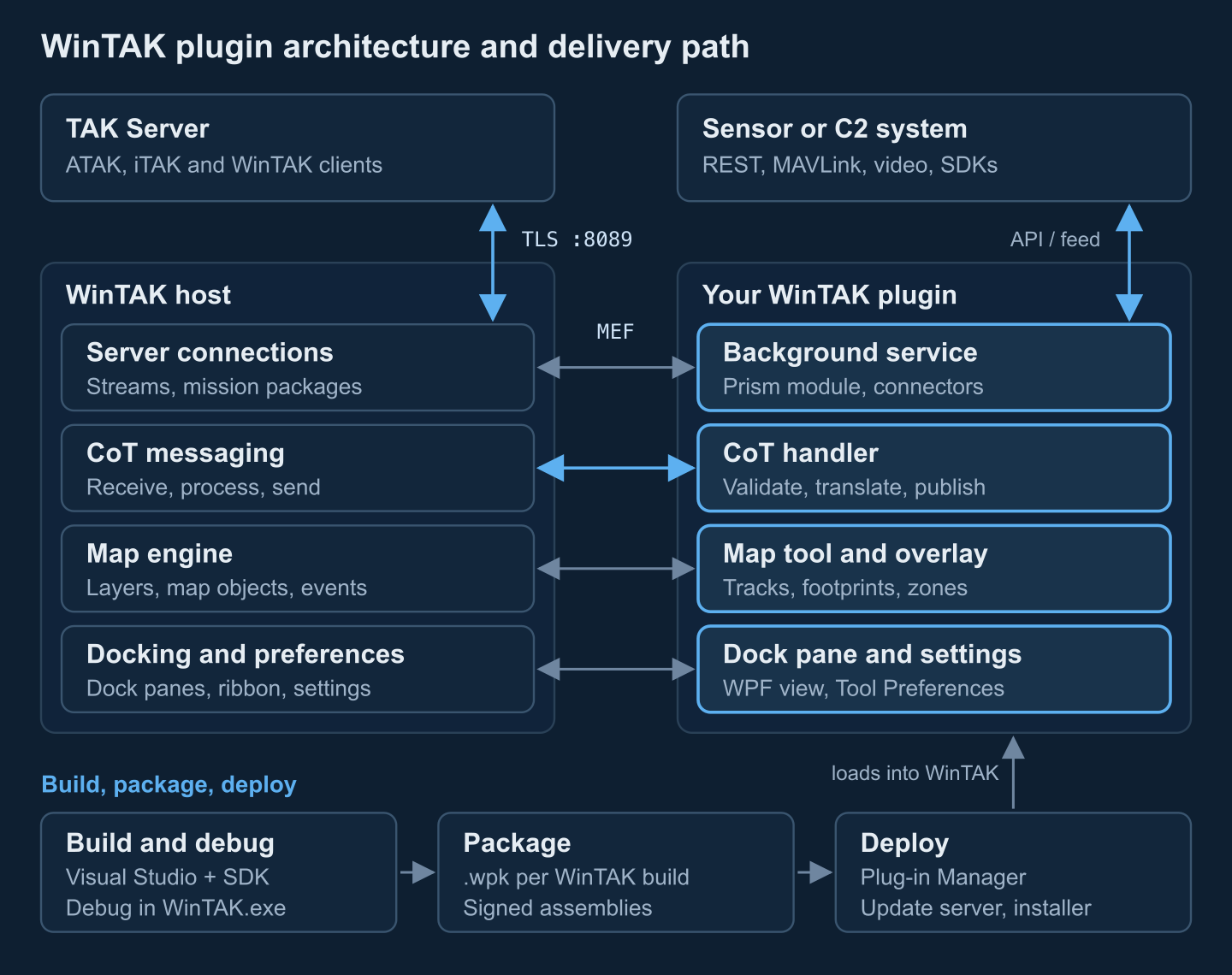
WinTAK plugin development workflow
- Toolchain. Install Visual Studio 2022 (Community is enough), the WinTAK SDK build matching your target release, and the WinTAK project templates.
- Project. Start from the WinTAK plugin template, or from a WPF User Control Library targeting .NET Framework 4.8.1 as the SDK guide does. Add the SDK's NuGet folder as a package source and pin package versions to the target build.
- Debugging. Set Start external program to
WinTAK.exewith the WinTAK install folder as working directory, so F5 launches WinTAK with your plugin and breakpoints work; Attach to Process covers a running instance. WinTAK reports newly discovered plugins on start; enable yours and it appears under the Plugins tab of the ribbon. - Testing. Connect to a lab TAK Server and replay recorded CoT, including malformed and stale events, alongside the external feed. Tick Log Debug Information (Application Menu, Support) for more detail.
- Packaging. Produce a .wpk per supported WinTAK build, with the plugin version and target build in the file name.
- Signing. Sign assemblies and installers with your organization's code-signing certificate; locked-down workstations with application allow-listing may refuse unsigned code. For operational baselines, tak.gov describes plugins being built, signed and keyed through the TAK Product Center pipeline, with a third-party signing service for off-contract developers. Confirm early which path your sponsor and variant expect.
- Distribution. Small fleets install from a shared folder through Plug-in Manager; larger ones run an internal update server or a scripted WinTAK install. The installer supports silent installs with selected components (
ADDLOCAL), but the quick start guide warns those values can change between versions.
What teams build as WinTAK plugins
- Sensor and drone feeds. Telemetry, sensor points of interest and footprints from UAS, radars, acoustic or RF sensors. tak.gov describes its UAS Tool sharing position, sensor point of interest, field of view and video with ATAK and WinTAK devices; a 2025 public walkthrough builds a MAVLink position panel for WinTAK. See sensor integration patterns and drone telemetry in TAK.
- C2 bridges. Translating tracks, tasks and control measures between a national or coalition C2 system and CoT in both directions, with one source of truth per data type.
- Data import and export. WinTAK already imports KML/KMZ, GPX, shapefiles, DTED and CoT files; a plugin adds a proprietary format or exports to a reporting system. Bundles follow the data package and mission package structure.
- Mission planning tools. Gridded reference graphics, routes and checklists. Standard plugins such as GRG Builder and ExCheck already cover part of this, so a custom tool usually encodes a unit-specific procedure.
- Video. WinTAK has a built-in video player and live video map display; plugins add vendor stream control or metadata-driven footprints. Our TAK video integration guide covers the stream side.
Need a WinTAK plugin built? We develop WinTAK and ATAK plugins that bridge sensors, drones and C2 systems into TAK: C# and WPF development against your target WinTAK build, CoT mapping and validation, .wpk packaging and an install path that fits your accreditation. Tell us about your integration →
WinTAK vs ATAK plugins
The two SDKs expose similar ideas (a map, a CoT bus, UI surfaces, an import path) but share no binaries: an ATAK .apk never loads in WinTAK, and vice versa.
| Aspect | WinTAK plugin | ATAK plugin |
|---|---|---|
| Language and runtime | C# on .NET Framework (4.8.1 in recent releases), 64-bit Windows | Java or Kotlin on Android |
| UI framework | WPF/XAML in dockable panes, ribbon buttons | Android views, typically in side drop-down panels |
| Discovery and lifecycle | MEF attributes; Prism modules initialized at startup; buttons and panes created lazily | Entry class declared in the plugin descriptor, with start and stop callbacks that register and remove components |
| Package | .wpk, or an optional component of the WinTAK installer | Signed APK |
| Distribution | Plug-in Manager (local folder or update server), drag and drop, installer, scripted install | tak.gov, MDM, sideloading, plugin repositories |
| Production signing | Code signing plus whatever your variant and sponsor require | APK signature; production ATAK-CIV from Google Play expects plugins signed through the tak.gov pipeline |
| Debugging | Visual Studio: start or attach to WinTAK.exe | Android Studio and adb on a device or emulator |
| Version coupling | One .wpk per WinTAK build | Built against a specific ATAK SDK version |
If a capability must exist on both clients, share the specification rather than UI code: CoT mappings, the external API contract and golden test messages both implementations must pass. Heavy algorithms can live in a native C or C++ core called through JNI on Android and P/Invoke on Windows. Our ATAK plugin development guide covers the Android side.
Security hardening for WinTAK plugins
A WinTAK plugin runs with the full privileges of the WinTAK process and sees every CoT message on the workstation, so treat it as part of the trusted computing base.
- Validate input. WinTAK has already parsed the CoT it hands you, but check the values: reject out-of-range coordinates, stale times in the past, unknown type prefixes and oversized UIDs or callsigns, and rate-limit per source so one runaway feed cannot freeze the UI. Parse your own inputs (feeds, files, API responses) with an
XmlReaderusingDtdProcessing.Prohibit, noXmlResolverand a size cap. Annotated CoT message examples make good test fixtures. - Least privilege. Operators should run WinTAK as standard users. Write plugin data under the user profile or WinTAK's ProgramData folder, never into Program Files at runtime, and require no elevation after installation. Keep API credentials in the Windows certificate store or under DPAPI, not in plain-text settings.
- No new attack surface. Prefer outbound connections to local listeners. In DoD programs every port, protocol and service a TAK application uses must be registered through DoD PPSM, so a new listener is paperwork as well as risk. Send no telemetry off the workstation.
- Controlled updates. Serve .wpk files from an internal HTTPS update server or a controlled share, keep the previous version for rollback, and sign what you ship. A plugin update is a code change on an accredited system.
- Known dependencies. Every NuGet package you add runs inside WinTAK: check it against the OSV advisory database and keep a software bill of materials. .NET assemblies decompile easily, so keep secrets and sensitive logic out of the client.
For tamper resistance on the Android side, see TAK plugin security hardening.
WinTAK version compatibility pitfalls
- One build, one target. Treat a .wpk as valid only for the WinTAK build it was compiled against. When users move from 5.8 to 5.9, rebuild against the 5.9 SDK packages and retest.
- Several releases a year. The TAK Product Center works on a 120-day development cycle with published feature freezes, so every release needs a planned rebuild and regression pass.
- Variant mismatch. CIV and MIL builds differ. A plugin can declare the variants it targets (
TakVariant) and the SDK version it was built with (TakSdkVersion); test on the variant your users run. - Dependency drift. Target exactly the host's .NET Framework version, and do not ship your own copy of an assembly WinTAK already loads, such as Prism, at a different version. Binding conflicts show up as plugins that quietly fail to load, so read the Errors, Log and Fatal files in
%AppData%\WinTAK\Logsfirst. - TAKX. Do not assume a WinTAK plugin will run unchanged in TAKX; until the TAK Product Center publishes a migration path for your variant, budget for a port.
Build vs buy: getting a WinTAK plugin quickly
If you need the capability in weeks rather than quarters, work down this list:
- Check what exists. Review the installer's optional components and the tak.gov WinTAK plugin listing; a government-owned plugin may already cover the core of the job.
- Ask the vendor. Sensor and C2 vendors often ship TAK integrations for their own products.
- Question the plugin. If your data can reach TAK Server or the local network as CoT, WinTAK displays it without a plugin. Build one for new UI, local processing, a new file format, device control or a two-way bridge.
- Budget for the life cycle. Plan a rebuild and regression pass per WinTAK release, a signing and distribution path that fits your accreditation, and support for every variant in the field. A team that has already solved MEF composition, CoT edge cases, packaging and version pinning removes most of the schedule risk early.
Need a WinTAK plugin for your sensors or C2 system?
We build WinTAK and ATAK plugins that bring sensor, drone and C2 data into TAK, with version-pinned builds, CoT validation and a deployment path that fits your accreditation.
Prepared by the Corvus Intelligence engineering team, which builds TAK plugins and CoT integrations for defense users; WinTAK SDK details were checked against the published SDK reference, the WinTAK user manual and tak.gov process documents. About Corvus Intelligence →