The TAK Federation Hub is an optional broker released alongside TAK Server. Instead of every TAK Server federating directly with every other, each server opens one federation connection to the hub; the hub authenticates the federates and forwards data according to an administrator-defined policy graph with per-edge group filters. Use it once you connect more than three servers or several administrative domains.
This page covers the architecture decision (hub versus direct server-to-server federation) and what running a hub involves: protocol versions and default ports, the policy model, PKI, deployment, operations and troubleshooting. To configure a single direct link between two servers, use our TAK Server federation setup guide.
- What it is: a hub-and-spoke broker for TAK Server federation (policy manager, messaging broker, admin web UI).
- Default ports: 9102/tcp federation v2, 9101/tcp federation v1, 9100/tcp admin UI.
- Dependencies: Java 17 and MongoDB; packaged as RPM, DEB and a Docker bundle.
- Maturity: the TAK Server Configuration Guide (version 5.7, March 2026) still labels the hub installer "beta".
Why a Federation Hub: the N² problem of direct federation
Direct federation is a bilateral agreement implemented in software. Per the TAK Server Configuration Guide, two administrators trade CA certificates, which each server keeps in a federate truststore separate from the one for local users, so the partner's server can connect but the partner's ATAK devices cannot. One of the two servers creates the outgoing connection, and both sides choose which groups may flow out of and into their server. Clients need no reconfiguration.
That is fine for two or three servers. A full mesh of n servers needs n(n−1)/2 links: 6 for four servers, 45 for ten. Every link means a CA exchange, a firewall opening on the listening side and group settings on both ends, and every policy change is repeated per link.
The Federation Hub replaces the mesh with a star. Each TAK Server federates once, with the hub, which manages connections and trust and brokers every message along the edges of a policy graph, filtered by TAK group. Three things change:
- Trust: each TAK Server imports one external CA, the hub's, instead of one per partner. The hub holds the partner CAs.
- Reachability: spokes usually dial out to the hub, so forward servers behind NAT or one-way firewalls need no inbound openings. Only the hub listens.
- Policy: who receives what lives in one graph instead of dozens of per-server settings, while each server still controls what leaves it.
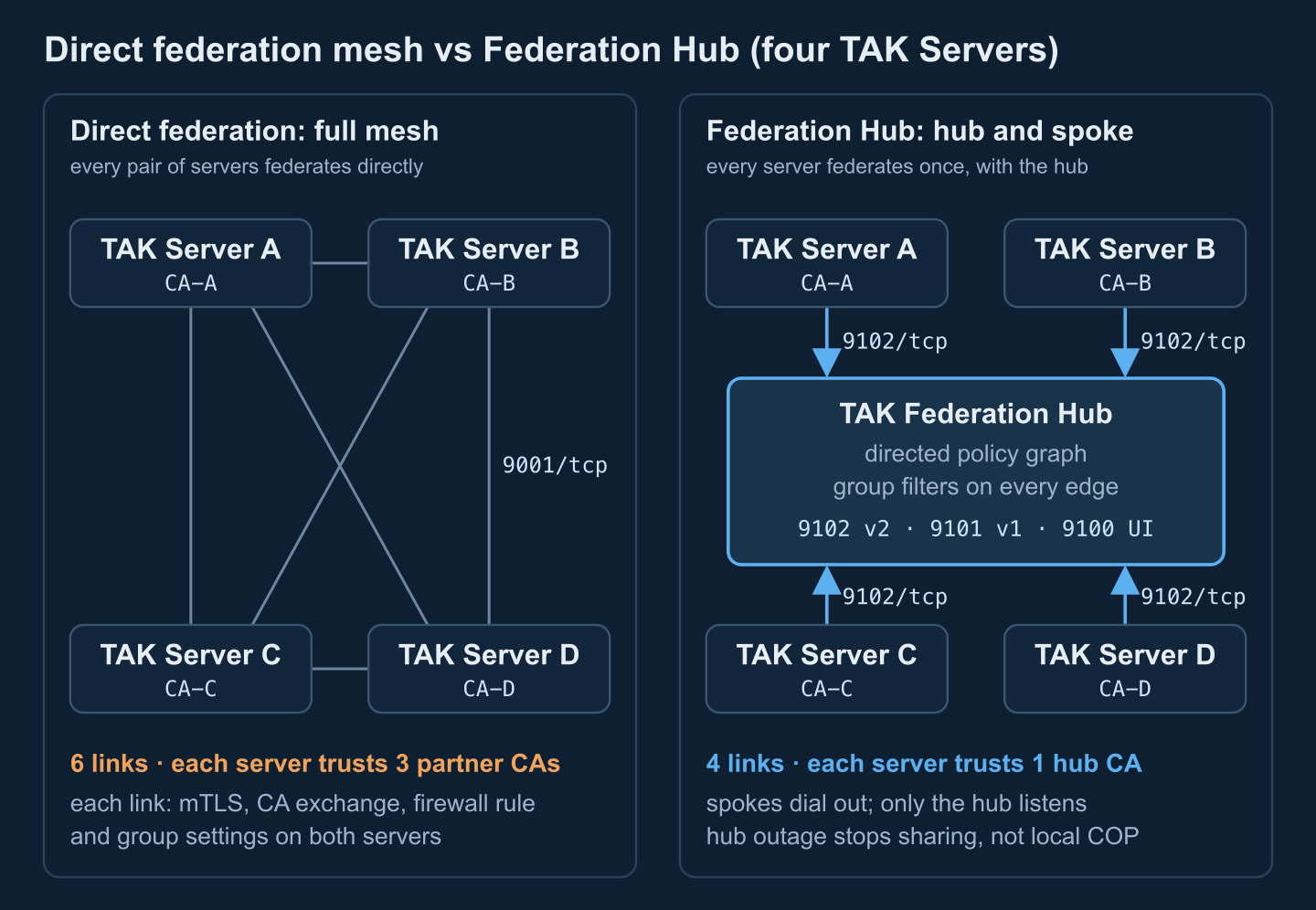
The costs are real too: an extra broker hop on every cross-server message, a new high-value system that terminates every federation session and can see all brokered traffic, and a single point of failure for sharing between servers. When the hub is down, each server's local picture keeps working; only the exchange stops.
Federation protocol versions and default ports
TAK Server speaks two federation protocols. Federation v1 is the original: a long-lived TLS socket carrying protobuf-encoded federated events. Federation v2 carries protobuf messages over gRPC (HTTP/2) with the same mutual TLS, and it is the version enabled in TAK Server's example configuration, where v1 ships disabled. The protocol is chosen per outgoing connection, and the guide's warning applies: pick the protocol version that matches the port you connect to. For the client side of the story, see TAK protocol: CoT XML vs protobuf.
| Component | Listener | Default | Notes |
|---|---|---|---|
| TAK Server | Federation v1 | 9000/tcp | Disabled in the example CoreConfig.xml |
| TAK Server | Federation v2 (gRPC) | 9001/tcp | Enabled; the port direct peers connect to |
| TAK Server | Token-authenticated federation | admin-chosen | Optional fallback where mutual TLS is impossible |
| Federation Hub | Federation v2 (gRPC) | 9102/tcp | The port spokes normally connect to |
| Federation Hub | Federation v1 | 9101/tcp | Enabled in the shipped broker config; disable if unused |
| Federation Hub | Admin web UI (HTTPS) | 9100/tcp | Login with an authorized X.509 certificate |
| Federation Hub | MongoDB | 27017/tcp | Local database; never expose it |
These are defaults; confirm them in your own files. TAK Server's example configuration:
<federation>
  <federation-server port="9000" v1enabled="false" v2port="9001" v2enabled="true">
    <tls context="TLSv1.2" keymanager="SunX509"
         keystore="JKS" keystoreFile="certs/files/takserver.jks" keystorePass="atakatak"
         truststore="JKS" truststoreFile="certs/files/fed-truststore.jks" truststorePass="atakatak"/>
  </federation-server>
</federation>
And the hub's broker configuration, /opt/tak/federation-hub/configs/federation-hub-broker.yml (excerpt):
v1Enabled: true
v1Port: 9101
v2Enabled: true
v2Port: 9102
dbPort: 27017
Practical rule: standardise every connection on v2, point TAK Server outgoing connections at the hub's 9102, and switch v1 off on the hub unless a legacy peer still needs it. Group filtering depends on it as well: v1 connections carry no TAK group information to the hub, so any edge that filters by group drops v1 traffic.
How the Federation Hub routes traffic: policy graph and group filters
The hub runs as cooperating Java services under one federation-hub system service: a policy manager, a messaging broker and an administrative web UI (recent packages add a plugin manager). Routing comes from a policy graph you draw in the UI. Its nodes are:
- CA groups: every federate whose certificate chains to an uploaded CA joins that CA's group. Most policies are written against CA groups, which in practice means against organisations.
- Federates: individual TAK Servers, for when one server needs different treatment from the rest of its organisation.
- Outgoing connections: connections the hub itself opens to a TAK Server or another hub, which is how multi-hop, hub-to-hub topologies are built.
- Token groups: federates that authenticate with tokens instead of mutual TLS.
Edges are directed. An edge from A to B lets A's traffic reach B, not the reverse, so two-way sharing needs two edges, and one-way feeds (a partner that receives your blue-force picture but sends nothing back) are a first-class pattern. Each edge carries a group filter: all groups, allowed groups, disallowed groups, or allowed and disallowed. The groups are the TAK Server groups attached to each message, which ATAK users see as channels. A message passes an allow-list edge if at least one of its groups is listed and fails a deny-list edge if any of its groups is listed; a message that carries no groups passes only an all-groups edge.
CA groups also have an Interconnected flag: members of an interconnected group exchange everything with each other, with no edge and no filtering. That is convenient inside one organisation and dangerous in a coalition, so check it on every group you add. The editor also separates saving a policy from activating it; a saved but inactive policy changes nothing.
Data minimization: three filter stages
- Source TAK Server: the outbound groups set for the hub federate decide what leaves your server at all. In a coalition, this is the only stage you fully control.
- Hub edges: decide which destinations receive which groups.
- Destination TAK Server: inbound groups and federated group mapping decide which local users see incoming traffic.
Files need their own rules. TAK Server's Data Package and Mission File Blocker blocks federated files by extension (pref by default, so configuration files cannot reconfigure partner devices), and mission federation is a separate decision from CoT sharing; see TAK data packages and mission packages. The guide also states the limit plainly: each domain controls what it shares, not what the other domain does with it. Clients are untouched by all of this: ATAK, WinTAK and browser clients such as CloudTAK keep talking to their own server.
Certificate trust model: CAs, federate identities and revocation
Federation trust is CA-based mutual TLS. In a hub topology:
- Each TAK Server imports the hub's CA into its federate truststore (the hub UI can download its own CA) and presents its server certificate when it connects.
- The hub imports each organisation's CA; uploading it creates the CA group the policy refers to.
- A federate's identity is its certificate, and its issuing chain decides its CA groups. A server whose chain includes an intermediate CA can land in several CA groups, and then the edges of all of them must allow the traffic.
Four design rules follow:
- Use a dedicated federation CA per organisation. The configuration guide describes this alternate setup, a separate CA and server certificate used only for federation, so partners never see the CA that signs your client certificates, and removing one CA from the hub cuts off exactly one organisation.
- Plan revocation before you need it. Edges written against a CA group apply to every server from that CA. To cut off one compromised server without touching its organisation, give high-risk peers per-federate edges or rely on revocation checking (the hub broker has an OCSP option, off by default). Disconnected networks without an OCSP responder fall back on short certificate lifetimes and a rehearsed CA-removal drill.
- Protect the hub key like a CA key and change the default keystore passwords (
atakatakin the shipped examples): whoever holds the hub's key can impersonate it to every spoke. - Treat token authentication as an exception. TAK Server and the hub can authenticate federation with tokens where TLS-inspecting ("break and inspect") proxies make mutual TLS impossible; the guide itself notes tokens are less secure than mTLS.
For PKI design across partner nations, see coalition identity management.
Federation Hub setup and deployment options
The hub is distributed on tak.gov as its own package next to TAK Server: takserver-fed-hub as an RPM (RHEL, Rocky) or DEB (Ubuntu, Debian), plus a Docker bundle that pairs a hub image with a separate MongoDB image. It requires Java 17 and MongoDB, where the broker stores federation events and metadata, and it runs with or without a co-located TAK Server. Give a theater or coalition hub a dedicated host: it is a trust anchor for every partner and should not share a failure domain or an admin team with any one spoke.
- PKI. Create the hub CA and server certificate with the same scripts and procedure as TAK Server (Appendix B of the configuration guide); the keystore and truststore live under
/opt/tak/federation-hub/certs/files/. - Install. Install Java 17, the hub package and MongoDB; set the database credentials in
federation-hub-broker.ymland run the hub's database configuration script. - Start and authorize. Start the service, authorize an admin certificate and log in to the UI on port 9100 with it (commands below).
- Exchange CAs. Upload each partner's federation CA in the hub UI and send every partner the hub's CA.
- Draw the policy. Add CA groups (and individual federates where needed), connect them with directed edges, set each edge's group filter, decide Interconnected per group, then save and activate.
- Connect each TAK Server. Enable federation v2, upload the hub CA under Federate Certificate Authorities, create an outgoing connection to the hub on 9102 with protocol v2, then set the hub federate's outbound and inbound groups.
- Test both directions. Send a known test track in a group that should pass and one in a group that should be blocked (our annotated CoT message examples make convenient fixtures), then check that the hub's Active Connections view shows the expected protocol version and group identities.
sudo systemctl restart federation-hub
sudo systemctl enable federation-hub

# authorize an administrator certificate (written to authorized_users.yml)
sudo su tak
java -jar /opt/tak/federation-hub/jars/federation-hub-manager.jar /path/to/admin.pem
exit

# then open https://hub.example.org:9100/ and log in with that certificate
Need it built, not just explained? We design and operate TAK Server deployments and federations (federation PKI, hub policy graphs, group catalogues, monitoring) and write the data-filtering and bridging services that sit beside them and connect TAK to C2 systems. Talk to our TAK engineers →
Federation Hub high availability and monitoring
The public Federation Hub documentation does not describe an active-active, clustered hub, so plan a fast warm standby rather than zero downtime:
- Back up the hub's state: certificates and keystores, policy files,
authorized_users.yml, the configs directory and the MongoDB database. The hub's upgrade notes tell you to save the policy file and authorized users first. - Keep a standby with identical certificates and policy behind a DNS name or virtual IP you can move. TAK Servers reconnect on their own, using the reconnection interval set on each outgoing connection.
- Make the spokes resilient: a hub outage stops sharing, not local operations, so most availability work belongs in each server; see TAK Server high availability and clustering.
- Size from measurement: there is no separate published hub sizing. Start from the guide's TAK Server baseline (4 cores, 8 GB RAM, 40 GB disk), then watch heap and message rates under exercise load; the server-side levers are in TAK Server performance tuning.
Monitor at three levels. In the hub UI, the metrics dashboard shows total connections, reads and writes per second, bytes per second, CPU and heap, and the Active Connections table lists each federate's remote address, protocol version and group identities. On the hosts, collect /opt/tak/federation-hub/logs and watch each TAK Server's federation status. Externally, probe 9102 and 9100, alert on certificate expiry for every federate CA and server certificate, track NTP offset, and alarm when the number of connected federates drops below the expected count.
Operational patterns: theater, coalition, exercise and per-domain hubs
Theater hub
Subordinate units run their own TAK Servers and federate upward to a hub at the higher headquarters. Units keep their local picture when backhaul fails, the hub decides which echelon sees which groups, and dial-out spokes suit forward servers behind NAT or satellite terminals.
Coalition hub
Each nation keeps its own TAK Server, CA and administrators; a hub run by the lead nation or a mutually trusted party carries the shared picture, with directed edges and allow-lists encoding release decisions. National outbound groups remain the first line of control. Where the coalition also uses NATO formats, a gateway at the national boundary handles translation; see bridging CoT and NATO standards and implementing an FMN affiliate.
Training and exercise hub
A hub with its own exercise CA, short-lived certificates and a scenario-specific policy lets participants join and leave without touching each other's servers. Afterwards you remove one CA and retire the policy; during the event, the hub's connection table doubles as an attendance and health board.
One hub per classification domain
A hub filters by group; it is not a guard. It does not inspect content against release rules and is not accredited to move data between classification levels. Run a separate hub per security domain and connect domains only through an accredited cross-domain solution, a separate product with its own accreditation; see cross-domain solution guard architecture.
Hubs can also open outgoing connections to other hubs, so a national hub can peer with a coalition hub. Keep such chains short: every hop adds latency and another policy to keep consistent.
Troubleshooting Federation Hub connections
- TLS handshake fails or the link keeps reconnecting. Usually the chain: the spoke must trust the hub's CA (not only its server certificate), the hub must hold the spoke's issuing CA including intermediates, nobody may have swapped in a client certificate, and nothing may be expired.
- Connected, but nothing flows. Policy, not network: is the spoke's CA group in the active policy, does an edge exist in the direction you expect, did the source server set outbound groups for the hub federate, and did the destination set inbound groups?
- Some groups flow, others do not. Group names must match exactly, a message without groups passes only all-groups edges, and v1 connections carry no groups. On the receiving TAK Server, federated group mapping falls back to the federate's group settings when no mapping matches.
- Too much flows. Look first for an Interconnected CA group or an all-groups edge.
- Clock skew. Certificate validation and CoT time and stale values all depend on the clock; run NTP from a common source on the hub and every spoke.
- Firewall, NAT and proxies. The hub must accept 9102/tcp (and 9100/tcp only from admin networks); stateful firewalls with short idle timeouts drop quiet connections; TLS-inspecting proxies break mutual TLS, so exempt the federation path or use token authentication.
- Version mismatch. An outgoing connection set to v2 but pointed at a v1 port, or the reverse, never comes up.
- Cloned servers. TAK Server writes a random server ID into
CoreConfig.xmlon first start and stamps it as a flow tag on processed messages, discarding anything already carrying its own tag to prevent routing loops. Federates built from a cloned, already-initialised server share that ID; give each its own.
# Which certificate chain does the hub present on the v2 port?
openssl s_client -connect hub.example.org:9102 -showcerts </dev/null

# Which CAs does this TAK Server trust for federation?
keytool -list -keystore /opt/tak/certs/files/fed-truststore.jks

# Is this host's clock synchronised?
timedatectl status
Direct federation vs Federation Hub vs one shared TAK Server
| Criterion | Direct federation | Federation Hub | One shared TAK Server |
|---|---|---|---|
| Best fit | 2–3 servers, stable partners | 4+ servers or several administrative domains | One organisation, one admin team |
| Links for n servers | n(n−1)/2 (6 for four) | n (4 for four) | None; all clients on one server or cluster |
| External CAs per server | n−1 partner CAs | 1 (the hub's) | None; one PKI for all users |
| Inbound openings | Listening side of every link (9001/tcp for v2) | Hub only (9102/tcp for v2) | Client ports on the one server |
| Where sharing policy lives | Per link, on both servers | Hub policy graph plus each server's groups | Groups inside one server |
| Data path | One hop | Two hops via the broker | No federation hop |
| If the middle fails | Only that pair stops sharing | All cross-server sharing stops; local pictures continue | Everyone loses the picture unless clustered |
| Extra infrastructure | None | Hub host, MongoDB, PKI, monitoring | Larger server or cluster |
| Administrative autonomy | Full | Full locally; hub operator sees brokered traffic | None; one administrative domain |
Rule of thumb: for two or three stable partners, federate directly. For four or more servers, several administrative domains or a partner list that changes every exercise, use a hub. For one organisation with one admin team, a single clustered TAK Server with groups is simpler than any federation.
Federation planning checklist
- Inventory every federate: owner, TAK Server version, reachability and protocol (v2).
- Choose the topology with the table above; name the hub operator and who approves its configuration.
- Design the PKI: a federation CA per organisation, certificate lifetimes, renewal dates and a revocation procedure; change default keystore passwords.
- Agree a group catalogue across partners: exact group names, what each server sends (outbound) and accepts (inbound).
- Draw the policy graph on paper first: directed edges, filter type per edge, and an explicit Interconnected decision for every CA group.
- Decide file and mission federation separately from CoT, and keep the
preffile blocker on. - Open the firewall: 9102/tcp inbound to the hub, 9100/tcp from admin networks only, outbound-only for spokes; check NAT idle timeouts and TLS inspection.
- Synchronise time on every host.
- Write a test matrix with one must-pass and one must-block case per edge, and rerun it after every policy change.
- Set up monitoring, backups and a rehearsed standby-hub failover.
- Keep one hub per security domain; anything that crosses domains goes through an accredited cross-domain solution.
Planning a multi-server TAK federation?
We design TAK federations end to end, from hub or mesh topology and federation PKI to policy graphs and group catalogues, and build the filtering and bridging services that connect TAK to your C2.
Prepared by Corvus Intelligence engineers who build TAK plugins, CoT integrations and C2 software; ports, defaults and procedures were checked against the TAK Server Configuration Guide 5.7 and the Federation Hub installation notes shipped with TAK Server. About Corvus Intelligence →